Showing posts with label reviews. Show all posts

June 14, 2011

The Internet Infrastructure and How It Connects

How The Internet Connects


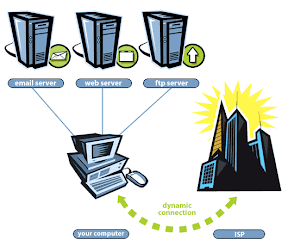
The internet is connected when a user logs into their pc and browse a website by typing in the url. The URL is known as a Domain Name Server; which maps domain names to their IP address. In order for you to even connect to the internet, you must have a Local ISP or Access Providers. Your Local ISP is connected to a regional access router which pools other local ISPs. The regional access router are connected to back haul providers. Back haul providers is capable of handling the massive amounts of Internet traffic that continues to grow.

Definitions You Should Know


ATT Logo

Access Providers

The web is really made of many networks connected in a hierarchy. Local Internet service Providers (ISPs) typically give residential and small business access to the Internet. Regional providers typically connect serveral local ISPs to each other and to back haul providers that connect with other regional poroviders.
DynDNS Logo

Domain Name Server (DNS)

This server maps domain names to their IP addresses. One of the main reasons that the Internet has taken off in use and popularity is because www.ccnacentral.info is much easier to remember than. 34.123.13.3.
Web Servers

Web Servers

All web pages are stored on computers called web servers. Thousands of these servers can be dedicated servers for companies, hosting servers that house many personal pages, or even single computers housing individual pages.
Back Haul Providers

Back Haul Providers

A few back haul providers comprise the high-speed backbone of the Internet. Only a handful of these providers are capable of handling the massive amounts of Internet traffic that continues to grow. Many parts of the back haul providers overlap with each other, which improves both the speed and reliability of the network.

Helpful Sites


June 02, 2011

At-a-Glance: OSI Model

Why should I Care About the OSI Model?

The OSI model serves as a guideline for creating and implementing network standards, devices, and internetworking schemes. Advantages of using the OSI model include the following:
  • Breaks up interrelated aspects of network operation into less-complex elements.
  • Enables companies and individual engineers to specialize design and development efforts on modular functions.
  • Provides standard interfaces for plug-and-play compatibility and multivendor integration.
  • Abstracts different layers of the network from each other to provide easier adoption of new technologies within a layer.


Develop mnemonics to help you memorize the layers and their order. Here's an example:
Please Do Not Throw Sausage Pizza Away

What Problems Need to Be Solved?

OSI layers can communicate only with the layer directly above or below it on the stack, and with its peer layer on another device. A process must be used so that information can be passed down the stack, across the network, and back up the stack on the peer device.

February 28, 2010

The physical layer, hubs, and ethernet

The main functions of the physical layer is to send bits and receive bits, as well as state transitions.

  • Bits come in only values of 1 or 0 (morse code with numerical values).
  • State transitions – changes in voltage from high to low and vice-versa.

Hubs at the physical layer

What is a hub?

  • A hub is really a multiple port repeater.

Hubs in a network

  • All devices in the same collision domain.
  • All devices in the same broadcast domain.
  • Devices shares some bandwidth.

What is a Physical Star Network?

  • A physical star network is where the hub is a central device and cables are extended in all directions from it.

Note: Hubs and repeaters can be used to enlarge the area covered by a single LAN segment, however, this is NOT RECOMMENDED.

Ethernet at the physical layer

  • Created by a group called DIX (Digital, Intel, Xerox)
  • There are three types of ethernet
    • 802.3u – Fast Ethernet
    • 802.3ab – Gigabit Ethernet on Category 5
    • 802.3ae – 10Gbps over fiber and coax

Electronics Industries Association and The Newer Telecommunications Industry Alliance (EIA/TIA)

  • The standard body that creates the physical layer/specifications for ethernet.
  • EIA/TIA specifies that ethernet use a registered jack (RJ) connector with a 4 5 wiring sequence on unshielded twisted pair (UTP) cabling (RJ45).

Cables

  • Cables are measured in decibals (dB)
  • Cabling in corporate and home markets is measured in categories.
    • A higher quality cable will have a higher rated category and lower attenuation.
      • ex. category 5 > category 3

Key term:

  • Crosstalk – the unwanted signal interference from adjacent pairs in the cable.

February 14, 2010

A closer look at the Data-Link layer

The Data-Link layer provides physical transmission of the data and handles error notifications, network topology, and flow control.

Lets take a closer look at it’s function

  1. Ensures messages are delivered to the proper device on LAN using hardware addresses and will translate messages from the Network layer to transmit.
  2. Transmit messages into pieces called a data frame and adds a customized header containing the hardware destination and source address.
  3. Data-Link uses binary values and hexadecimal values.

Binary Values

Nibble Values Byte Values
8  4  2  1 128  64  32  16  8  4  2  1

Binary to Decimal Chart

Binary Value Decimal Value
10000000 128
11000000 192
11100000 224
11110000 240
11111000 248
11111100 252
11111110 254
11111111 255

Hexadecimals

Hex is short for hexadecimal, which is a numbering system that uses the first six letters of the alphabet (A through F) to extend beyond the available ten digits in the decimal system. Hexadecimal has a total of sixteen digits.

Hex to Binary to Decimal Chart

Hexadecimal Binary Decimal
0 0000 0
1 0001 1
2 0010 2
3 0011 3
4 0100 4
5 0101 5
6 0110 6
7 0111 7
8 1000 8
9 1001 9
A 1010 10
B 1011 11
C 1100 12
D 1101 13
E 1110 14
F 1111 15

Six major points of Routers

There are six major points to remember or keep in mind when working with routers or layer 3 devices. You should probably commit these to memory.

Here are the six major points

  1. Routers, by default, will not forward any broadcast or multi-task packets.
  2. Routers use the logical address in the network layer header to determine the next hop router to forward the packet to.
  3. Routers can use access list, created by an administrator to control security on the types of packets that are allowed to enter or exit an interface.
  4. Routers can provide layer 2 bridging functions if needed, and can simultaneously route through the same interface.
  5. Routers provide connections between virtual LANS (VLANS).
  6. Routers provide Quality of Service (QoS) for specific types of network traffic.

A closer look at the Network Layer

The network layer manages devices addressing, tracks location of devices on the network, and determines the best way to move data, which means the Network layer must transport traffic between devices that aren’t locally attached.

Lets take a closer look at it’s function

  1. Checks a packet when it is first received on a router interface.
  2. If the packet isn’t destined for that particular router, it will look up the destination network address in the routing table.
  3. Once the router chooses an exit interface, the packet will be sent to that interface to be framed and sent out on the local network.
  4. If the router is unable to locate an interface; the packets will be dropped.

Key Terms

Router – a router is a network layer device (layer 3 device) and provides the routing services within an internetwork.

Data packets – are used at the network layer to transport data through the internetwork.

Routed Protocols – are used to support data traffic.

Route Update Packets – are used to update neighboring routers about the networks connected to all routers within the internetwork.

Routing Protocols – are used to send out route updates packets.

Network Address

  1. A protocol specific network address.
  2. A router must maintain a routing table for individual routing protocols because each routing protocols keep track of a network with a different addressing scheme (ex. IP, IPv6, and IPX).

Interface – is the exit interface a packet will take when destined for a specific network.

Metric – is the distance to the remote network.

February 01, 2010

Visual of Windowing


Windowing Diagram

windowing

Window size of 1 = sending machine waits for an acknowledgement for each data segment it transmit before transmitting another segment.

Window size of 3 = allowed to transmit three data segments before an acknowledgement is actually received.

January 28, 2010

Types of flow control and a closer look at Windowing


The three types of flow control consists of:

  1. buffering
  2. windowing
  3. congestion avoidance

A closer look at what windowing is and it's function at the transport layer

Windowing

  • Windowing is the quantity of data segments (measured in bytes) that the transmitting machine is allowed to send without receiving an acknowledgement for them.
  • In other words, it's the break of time in between data segments of before and after.
  • Windowing is used to control the amount of outstanding, unacknowledged data segments.

Note: if hosts fails to receive all segments that it should have acknowledged, the host can improve the communication session by decreasing window size.

Connection-oriented Communication

Note: Recall that connection-oriented communications takes place in conjunction with flow control. These communication sessions, in combination of the protocols involved, provide for reliable data transports at the transport layer.

Diagram:

connectionoriented

This is what we call the "Three Way Handshake"

  1. The 1st "connection agreement" segment is a request for synchronization.
  2. At the 2nd and 3rd connection agreement, segments acknowledge the requests and establishes connection parameters (the rules) between hosts. These segments request that the receiver sequencing is synchronized here as well, resulting in a bidirectional connection.
  3. The final segment is also an acknowledgement. It notifies the destination host that the connection has been established – Data transfer can now begin.

How to identify a connection-oriented communication when you see one

  1. It has a virtual circuit set up. (i.e.. 3 way handshake)
  2. Use sequencing
  3. Use acknowledgements
  4. Use flow control

Question: What happens when a device receives a flooding of datagram's (packets) too quickly for it to process?

Answer: They store them in a memory section called a buffer.

Understanding how flow control operates at the Transport layer


A quick overview of the Transport layer and its function:

  • Reliable networking is used at the transport layer
    • Reliable networking = using acknowledgements, sequencing, and flow control in the network.
  • Segments and reassembles data into a data stream from the upper application layer and unites the information into the same data stream for further processing.

Flow Control

  • Flow control prevents a sending host on one side of the connection from overflowing the buffers in the receiving host.
    • an event that can result in data loss
  • Reliable data transports and employs a connection oriented communications sessions between systems and the protocols involved, to ensure that the following will be achieved:
    • Segments delivered are acknowledged back to the sender upon their reception.
    • Any segments not acknowledged are re-transmitted.
    • Segments are sequenced back into their proper order upon arrival at their destination.
    • A manageable data flow is maintained in order to:
      • avoid traffic congestion
      • overloading
      • data loss
  • The purpose of flow control is to provide means for the receiver to be able to govern the out of data sent by the sender.

Important additional functions of the OSI reference model's upper layers


Application layer

  • The application layer acts as an interface between the actual applications programs.
    • Example - Microsoft Word – actually does not reside at the application layer, but instead just interfaces at the application layer protocol, using data presented to it by the presentation layer.

Presentation layer

  • The presentation layer presents data to the application layer up top.
  • Responsible for data translation and code formatting.
  • Acts as a translator that presents and provides coding and conversion functions.
    • Example – EBCDIC to ASCII
  • Some presentation layer may also involves multimedia operations too.

Session Layer

  • The session layer is responsible for setting up, managing, and then tearing down sessions between layer entities.
  • Coordinates communication between systems and serves to organize their communication by offering THREE different modes:
    • Simplex
    • Half Duplex
    • Full Duplex
  • Keeps different application data separate from other applications data.

January 26, 2010

A quick overview of the OSI layers and their functions

Applications

  • file
  • print
  • message
  • database
  • application services

Presentations

  • data encryption
  • compression
  • translation

Session

  • dialog control

Transport

  • end-to-end connection

Network

  • routing

Data Link

  • framing

Physical

  • physical topology

Facts and notes on the OSI reference model bottom layers

The bottom layers of the OSI reference model include

  1. Transport
  2. Network
  3. Data Link
  4. Physical

Functions at each of the bottom layers

Transport
- provides reliable or unreliable delivery
- performs error correction before re-transmit

Network
- provides logical addressing, which routers use for path information

Data Link
- combines packets into bytes and bytes into frames
- provides access to media, using MAC address
- performs error detection, NOT correction

Physical
- moves bits between devices
- specifies voltage, wire speed, and pin-out of cables

The following operates at all seven layers of the OSI reference model

  1. Network Management Stations (NMS)
  2. Web and application servers
  3. Gateways (not default gateways)
  4. Network Hosts

Facts and notes on the OSI reference model

  1. The OSI reference model has seven layers and is divided into two groups.
  2. The top three layers define how the applications within the end stations will communicate with each other and with users.
  3. The bottom four layers define how data is transmitted end to end.

The upper layers of the OSI reference model include

  1. Application layer
  2. Presentation layer
  3. Session layer

*Note: Users interfaces with computer at the application layer.

*Note: The upper layers are responsible for applications communications between hosts.

Diagram

layersfunction

January 23, 2010

Advantages of using an OSI reference model

Advantages of using an OSI model include:
  1. Prevents changes in one layer from affecting other layers.
  2. Divides the network communication process into smaller and simpler components, thus aiding components development, design, and troubleshooting.
  3. Allows multiple-vendor development through standardization of network components.
  4. Encourages industry standardization by defining what functions occur at each layer of the model.
  5. Allows various types of hardware and software to communicate

*Reference model: conceptual blueprint of how communications should take place.

*Binding: communication processes that are related to each other are bounded, or grouped together, at a particular layer.

January 22, 2010

Tips on network, routers, and switches

1. Plan your network design carefully.

2. Use network bridge in network to reduce collisions within broadcast domains and to increase the number of collision domains in your network.

3. Using hubs can contribute to traffic congestion.

4. Routers break up collision domains as well as broadcast domains.

5. Although bridges/switches are used to segment networks, they WILL NOT isolate broadcast or multicast domains.

6. Even though you have a switched network, you still need a router to provide your inter-VLAN communication or internetworking.

January 12, 2010

The OSI reference model and it's seven layers


The OSI reference model has seven layers:

Application layer (layer 7)
Presentation layer (layer 6)
Session layer (layer 5)
Transport layer (layer 4)
Network layer (layer 3)
Data Link layer (layer 2)
Physical layer (layer 1)